
VIWO Restaurant ERP

Cloud POS · Qatar

The cloud POS that survives a dropped line.

Everything a cloud POS promises — browser Back Office, live sync, multi-outlet control — without the part where the till dies with the internet.

Works offline · Windows & macOS · Arabic & English · Multi-outlet

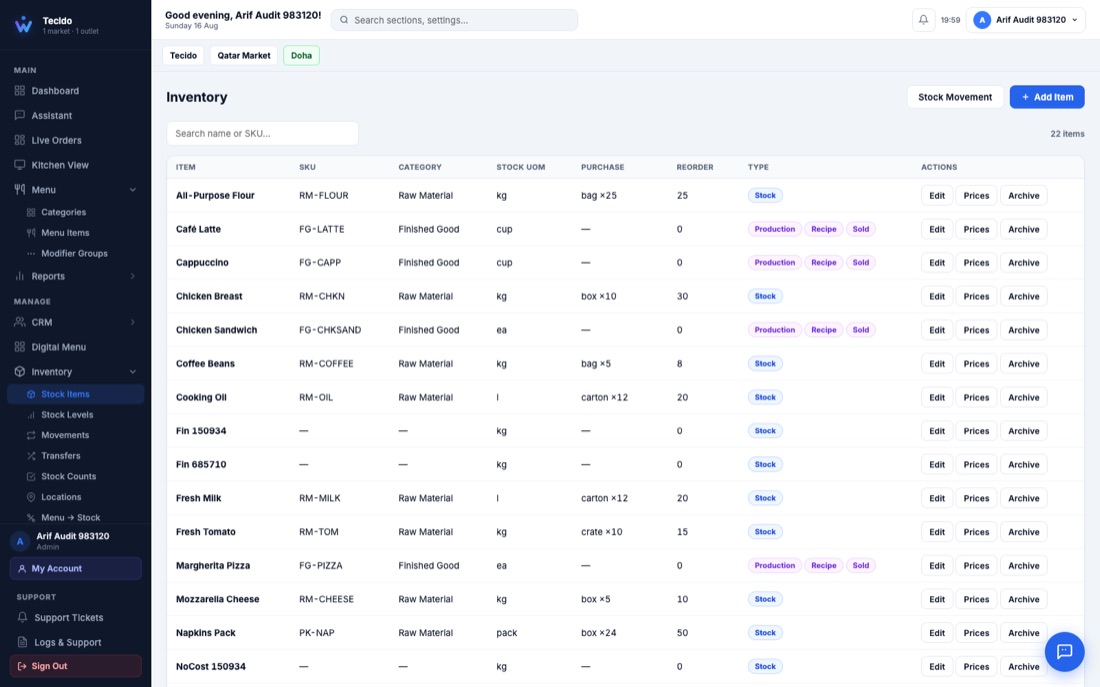
The real VIWO cloud Back Office managed from a browser in Qatar
The actual cloud Back Office — real screen, not a mock-up.

Cloud where cloud helps.

The good part of a cloud POS is real: your menu, prices, stock, staff permissions and 50+ reports live in the cloud Back Office and open in any browser — from the office, from home, or from the floor of a new outlet. Change a price once and every till, QR menu and kiosk follows.

Multi-outlet groups get one workspace across every branch: consolidated reporting, central menu control, branch transfers and per-outlet pricing, with each outlet's day-close kept independent.

  • Back Office in any browser
  • One menu across tills, QR and kiosk
  • Multi-outlet reporting in one place

Local where cloud fails.

The bad part of a typical cloud POS is the rush-hour truth: when the connection drops, a browser till stops billing. VIWO's till is a real application on your Windows or macOS machine with its own local database — billing, kitchen tickets and payments continue through an outage.

The moment the line returns, everything syncs back to the cloud automatically. Your day-close still ties, and head office still sees every order — a few minutes later, not never.

  • Full billing offline
  • Automatic sync when the line returns
  • No lost orders, no lost day-close

One platform behind the till.

The cloud POS is the front door to 26 connected modules: kitchen display, waiter ordering, self-service kiosk, QR table ordering, delivery rider app, Talabat order intake, inventory and purchasing, recipes and food costing, CRM, accounting and an owner's app on your phone.

Receipts and kitchen tickets print in Arabic and English on standard thermal printers, and every report exports to Excel and PDF.

  • 26 modules on one database
  • Arabic and English printing
  • Owner app with live sales

Common
questions.

Anything else — message the team on WhatsApp and you will get a straight answer.

What is the difference between VIWO and a normal cloud POS?

A normal cloud POS runs the till in a browser, so billing stops when the internet does. VIWO keeps the cloud Back Office and live sync, but the till itself runs locally on your machine — so service continues through an outage and syncs when the line returns.

Can I manage my restaurant from home with VIWO?

Yes. The cloud Back Office opens in any browser: menus, prices, stock, purchasing, staff and 50+ reports, plus an owner app for your phone with live sales and approvals.

Does the cloud sync cost extra?

Cloud sync and the Back Office are part of VIWO, not an add-on. Message the team on WhatsApp for a written quotation covering your outlets and terminals.

How fast do tills sync to the cloud?

Continuously while online — orders, payments and menu changes flow between the till and the cloud within moments. After an outage, the till catches up automatically.

Book a free demo

See the cloud POS on
your own menu.

The VIWO team in Doha will load your menu and walk you through the cloud POS at your outlet or over a call — and you will get a written quotation the same day.

  • Free demo on your own menu
  • Works online and fully offline
  • Arabic and English receipts and KOTs
  • Multi-brand and multi-outlet
  • Local team in Doha, Qatar
  • Written quotation the same day